
Power switch API (programming interface)
1. Introduction
All power switches are identified by and addressed/accessed by their mac address. This address is unique for all Ethernet based network devices connected to global Internet.
The mac address of a specific power switch can be obtained in multiple ways - when the power switch is in access point mode, and when it is in normal operating mode. The information is obtained on web pages in a browser when interacting with power switch.
Each power switch has a password which is set when the switch is in access point mode, and can be reset. If 1 user operates multiple power switches they can decide to use the same password on all their power switches or use unique passwords for each power switch.
These one or multiple passwords need to be recorded by the user and are used for authentication.
2. Way of calling
All commands in the power switch API set are HTTPS POST commands to this url -
https://power.arstech.com/api.php
API callers have to specify parameters:
c - command, 1 number/letter -> 0-9, a-z
p1 - first parameter
p2 - second parameter
p3 - third parameter
p4, p5, p6 ... etc.
When doing the API POST call the user has to specify header -
"Content-Type: application/x-www-form-urlencoded"
Example of an API call
curl -X POST https://power.arstech.com/api.php
-H "Content-Type: application/x-www-form-urlencoded"
-d "c=1&p1=fa35cd45ef78&p2=12ab34&p3=1"
c - command, =1 (immediate ON/OFF)
p1 - first parameter, =fa35cd45ef78 (mac address)
p2 - second parameter, =12ab34 (session key)
p3 - third parameter, =1 (turn ON)
Each command leads to specific action and has a return. The specific command in the example is to turn ON the power switch, immediately.
3. Authentication
The first step in the interaction with the power switch is to authenticate.
The API caller has to provide the mac address and the passord for the power switch.
When the password match the command starts a session and returns a session key. This session key has to be used for all of the following API calls.
A session is valid for 300 seconds / 5 minutes. If no API calls are made in 300s the session expires and the user has to authenticate again.
If an API call is made with the current session key and within the 300s, then the session time is extended to 300s. Every other API call extends the session timeout as well.
4. API commands list and description
4.1 Authenticate with a specific power switch
description:
This commands selects a switch based on mac address, compares the switch password, if matching starts a session, and returns the session key.
parameters:
c=0 - command
p1=(mac address) - first parameter, 12 bytes hex (0-9,a-f)
p2=(password) - second parameter, various length, up 20 bytes
return:
(session key) - 6 bytes hex (0-9,a-f)
or, x - error, invalid mac address or password
example:
curl -X POST https://power.arstech.com/api.php
-H "Content-Type: application/x-www-form-urlencoded"
-d "c=0&p1=fa35cd45ef78&p2=my.Sw.pW1#"
example return: 78bc56
4.2. Immediate turn ON/OFF of power switch
description:
If the requested state is different than the current state of the switch then an immediate switch is performed to the requested state.
If the requested state is the same as the current state then no action is performed.
parameters:
c=1 - command
p1=(mac address) - first parameter, 12 bytes hex (0-9,a-f)
p2=(session key) - second parameter, 6 bytes hex (0-9,a-f)
p3=(state) - third parameter, 1 byte 0=turn OFF, 1=turn ON
return:
z - ok
or, x - error, invalid mac address or session key
example:
curl -X POST https://power.arstech.com/api.php
-H "Content-Type: application/x-www-form-urlencoded"
-d "c=1&p1=fa35cd45ef78&p2=33aa77"
example return: z
4.3. Starts a delay period then turns ON/OFF of power switch
description:
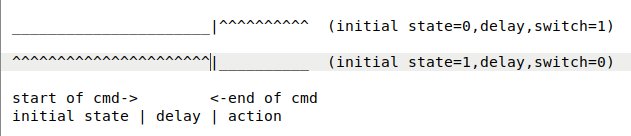
If the requested state is different than the current state of the switch then a delay period is started and in the end of the delay a switch is performed to the requested state.
If the requested state is the same as the current state then no action is performed.
This command can be cancelled at the ongoing delay phase by performing immediate turn ON/OFF (c=1) command, or the second type of delay command (c=3).
Recommended to use delay values of 30s or more.
parameters:
c=2 - command
p1=(mac address) - first parameter, 12 bytes hex (0-9,a-f)
p2=(session key) - second parameter, 6 bytes hex (0-9,a-f)
p3=(state) - third parameter, 1 byte 0=turn OFF, 1=turn ON
p4=(delay) - fourth parameter, up to 5 bytes decimal (0-9), from 1s to 99,999s
return:
z - ok
or, x - error, invalid mac address or session key
example:
curl -X POST https://power.arstech.com/api.php
-H "Content-Type: application/x-www-form-urlencoded"
-d "c=2&p1=fa35cd45ef78&p2=33aa77&p3=1&p4=100"
example return: z
4.4. Immediate turn ON/OFF, then starts a delay period then turns ON/OFF to initial state of power switch
description:
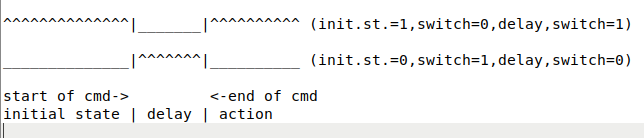
If the requested state is different than the current state of the switch then a switch is performed to the requested state, then a delay period is started and in the end of the delay a switch is performed to the initial state.
If the requested state is the same as the current state then no action is performed.
This command can be cancelled at the ongoing delay phase by performing immediate turn ON/OFF (c=1) command, or the first type of delay command (c=2).
Recommended to use delay values of 30s or more.
parameters:
c=3 - command
p1=(mac address) - first parameter, 12 bytes hex (0-9,a-f)
p2=(session key) - second parameter, 6 bytes hex (0-9,a-f)
p3=(state) - third parameter, 1 byte 0=turn OFF, 1=turn ON
p4=(delay) - fourth parameter, up to 5 bytes decimal (0-9), from 1s to 99,999s
return:
z - ok
or, x - error, invalid mac address or session key
example:
curl -X POST https://power.arstech.com/api.php
-H "Content-Type: application/x-www-form-urlencoded"
-d "c=3&p1=fa35cd45ef78&p2=33aa77&p3=1&p4=100"
example return: z
4.5. Set cut off temperature and/or current consumed of power switch
description:
The power switch is equipped with a temperature and current sensors. When power switch is turned ON and there is high current consumed the power switch generates heat.
This command allows setting a maximum value for the power switch internal temperature, and consumed current which if exceeded will trigger turning OFF of the power switch.
The command can :
- set cut-off temperature only
- or, set cut-off current only
- or, set cut-off temperature & cut-off current
parameters:
c=4 - command
p1=(mac address) - first parameter, 12 bytes hex (0-9,a-f)
p2=(session key) - second parameter, 6 bytes hex (0-9,a-f)
p3=(temperature) - third parameter, 2 or 3 bytes, decimal(0-9), in degrees Celsius
p4=(current) - fourth parameter, 2 or 3 bytes, decimal(0-9), in Ampers
return:
z - ok
or, x - error, invalid mac address or session key
example:
curl -X POST https://power.arstech.com/api.php
-H "Content-Type: application/x-www-form-urlencoded"
-d "c=4&p1=fa35cd45ef78&p2=33aa77&p3=99&p4=130"
(set cut-off: temperature=99 degrees Celsius, current=130 Ampers)
example return: z
4.6. Start/stop recording of current/power consumed of power switch
description:
The power switch is equipped with a current sensor. This command, when power switch is turned ON, allows recording moment to moment of the consumed current.
Normally the input voltage to the power switch is (almost) the same, for ex. be it 110/220/380V.
Multiplying the consumed current for a period of time to the input voltage will give the consumed power for a period of time.
Furthermore, every electric power consumer is served by a power utility provider which has specific pricing rates. Measuring consumed power allows calculation of charge for billing.
This API call only does recording of current consumed. Additional API calls do handle calculation of power, calculation of charge, getting a payment, etc.
The command can :
- set previous recording to zero, and begin new recording
- end recording, and keep values to be reported in - Get status (ch. 4.7)
parameters:
c=5 - command
p1=(mac address) - first parameter, 12 bytes hex (0-9,a-f)
p2=(session key) - second parameter, 6 bytes hex (0-9,a-f)
p3=(1-start,0-stop) - third parameter, 1 byte
return:
z - ok
or, x - error, invalid mac address or session key
example:
curl -X POST https://power.arstech.com/api.php
-H "Content-Type: application/x-www-form-urlencoded"
-d "c=5&p1=fa35cd45ef78&p2=33aa77&p3=1"
(start current recording)
example return: z
4.7. Get status of power switch
description:
Returns information on the current:
- state - 0/1 (ON/OFF)
- temperature - float, in Celsius and Fahrenheit
- consumed current - float, in Ampers
- remaining delay of c=2, or 0
- remaining delay of c=3, or 0
Returned values can be parsed between '=' and ',' letters
parameters:
c=6 - command
p1=(mac address) - first parameter, 12 bytes hex (0-9,a-f)
p2=(session key) - second parameter, 6 bytes hex (0-9,a-f)
return:
string in format of -
parameter=value,parameter=value...
or, x - error, invalid mac address or session key
example:
curl -X POST https://power.arstech.com/api.php
-H "Content-Type: application/x-www-form-urlencoded"
-d "c=6&p1=fa35cd45ef78&p2=33aa77"
example return:
state=1,temeratureC=21.5,temperatureF=72.1,current=126.3,delayC2=100,delayC3=0
(state is ON, temperature Celsius = 21.5, temperature Fahrenheit = 72.1, remaining delay of command2 is 100s, no delay of command3)
4.8. Stop global access, start local access, power switch becomes WiFi access point
description:
Special mode - requesting to power switch to stop connecting to power.arstech.com, start a WiFi access point, and wait for clients to connect to the WiFi network of the power switch, load in browser this address - http://192.168.4.1/ and then communicate locally with the power switch.
The move from global to local and becoming a WiFi access point is temporary. Within 60 seconds A user have to connect to the WiFi AP of the power switch and load in browser - http://192.168.4.1/ .
Every interaction with the switch WiFi AP sets the timeout to 60s.
During this time the switch is not reporting status or taking commands through this API.
If 60s pass without interaction with the switch WiFi AP, the switch automatically reverts back to global communication and this API becomes operational again.
In the local WiFi AP mode, the power switch has another API set and instead of waiting for a timeout the user can initiate the reverting back to global communication of the power switch.
parameters:
c=7 - command
p1=(mac address) - first parameter, 12 bytes hex (0-9,a-f)
p2=(session key) - second parameter, 6 bytes hex (0-9,a-f)
return:
z - ok
or, x - error, invalid mac address or session key
example:
curl -X POST https://power.arstech.com/api.php
-H "Content-Type: application/x-www-form-urlencoded"
-d "c=7&p1=fa35cd45ef78&p2=33aa77"
example return: z
4.9. Check if RFID/NFC card/token is present, return UID
description:
The power switch device is equipped with a RFID/NFC card/token reader. This reader is continuously scanning and if a RFID/NFC card/token is put close, the reader obtains the UID of the RFID/NFC card/token.
The UID is unique value which is either 4 bytes (programmable card/token or bank debit card) or 7 bytes (credit card). The UID value is unique and defined at card/token manufacturing time. The UID value is different than the (normally) 16 digit debit/credit card number.
RFID/NFC card/token can store a small amount of data, in several sectors/areas. Access to these areas has to be authenticated in order to do read or write of data.
Data areas of bank debit or credit cards is protected, but open to read/write on programmable RFID/NFC card/tokens.
Again, this API call returns, when available, only the UID number of a specific RFID/NFC card/token, and does not read the data areas.
From the moment RFID/NFC card/token is detected and read the UID number is available for 60 seconds and then removed and no longer available.
The UID number is associated with the mac address of a specific power switch and can be used for access control, and/or billing purposes. Other, additional API calls do this.
parameters:
c=8 - command
p1=(mac address) - first parameter, 12 bytes hex (0-9,a-f)
p2=(session key) - second parameter, 6 bytes hex (0-9,a-f)
return:
(UID) - 8 or 14 characters hex (0-9,a-f)
or, x - error, invalid mac address or session key
example:
curl -X POST https://power.arstech.com/api.php
-H "Content-Type: application/x-www-form-urlencoded"
-d "c=8&p1=fa35cd45ef78&p2=33aa77"
example return: aa55bb66
5. Live test and sample .php code
We are providing a web page placed on our web site which allows live test with real power switch device.
The same page was renamed as .txt file so that it can be viewed and downloaded without being run on the web server.
Rename the file after downloading to .php and use it as a template for building a web enabled applications for the power switch.